

Manual work is expensive when it repeats. That does not mean the most visible manual task should be automated first.
A WooCommerce team may be copying order data, checking inventory, routing refunds, applying customer tags, correcting product records, or chasing failed integrations. The workload is real. The instinct is reasonable: find a tool that removes the touch.
But automation repeats the rule encoded in the workflow. If the inputs are unreliable, the decision is inconsistent, the exception boundary is unclear, or nobody owns recovery, automation can move the same ambiguity faster and make the failure harder to see.
The first question is not, “Which tool can do this?”
It is, “Is this workflow defined well enough to run without an operator interpreting it each time?”
Automation is a force multiplier for the operating rule
Every repeatable workflow contains a rule, whether the business has documented it or not.
An operator may release an order after checking payment status, inventory, address quality, fraud signals, customer history, and fulfillment restrictions. Another person may decide whether a return qualifies for a refund after interpreting product condition, policy, timing, order type, and prior communication.
The work can look like one manual step. The operator may actually be resolving several hidden decisions.
Automating the visible click without defining those decisions does not remove the underlying complexity. It moves the complexity into configuration, exception queues, support tickets, reconciliation, and recovery work.
Good automation makes an agreed rule execute consistently. Weak automation hides an unresolved rule inside a system.
Start with the constraint, not the task count
A high-volume manual task may be a useful candidate. It may also be a symptom of a different problem.
Before building or buying anything, identify why the work exists.
- If operators correct incomplete product data, the constraint may be the source of truth or the validation process.
- If orders are checked because several systems disagree, the constraint may be integration reliability or timing.
- If refunds require repeated escalation, the constraint may be an undefined decision policy.
- If a team rebuilds reports, the constraint may be inconsistent definitions rather than insufficient reporting automation.
- If people monitor a process because failures are invisible, the constraint may be observability.
Fixing the source can remove work that an automation would otherwise preserve. It can also make the remaining automation simpler, easier to test, and easier to reverse.
Use an automation-readiness gate
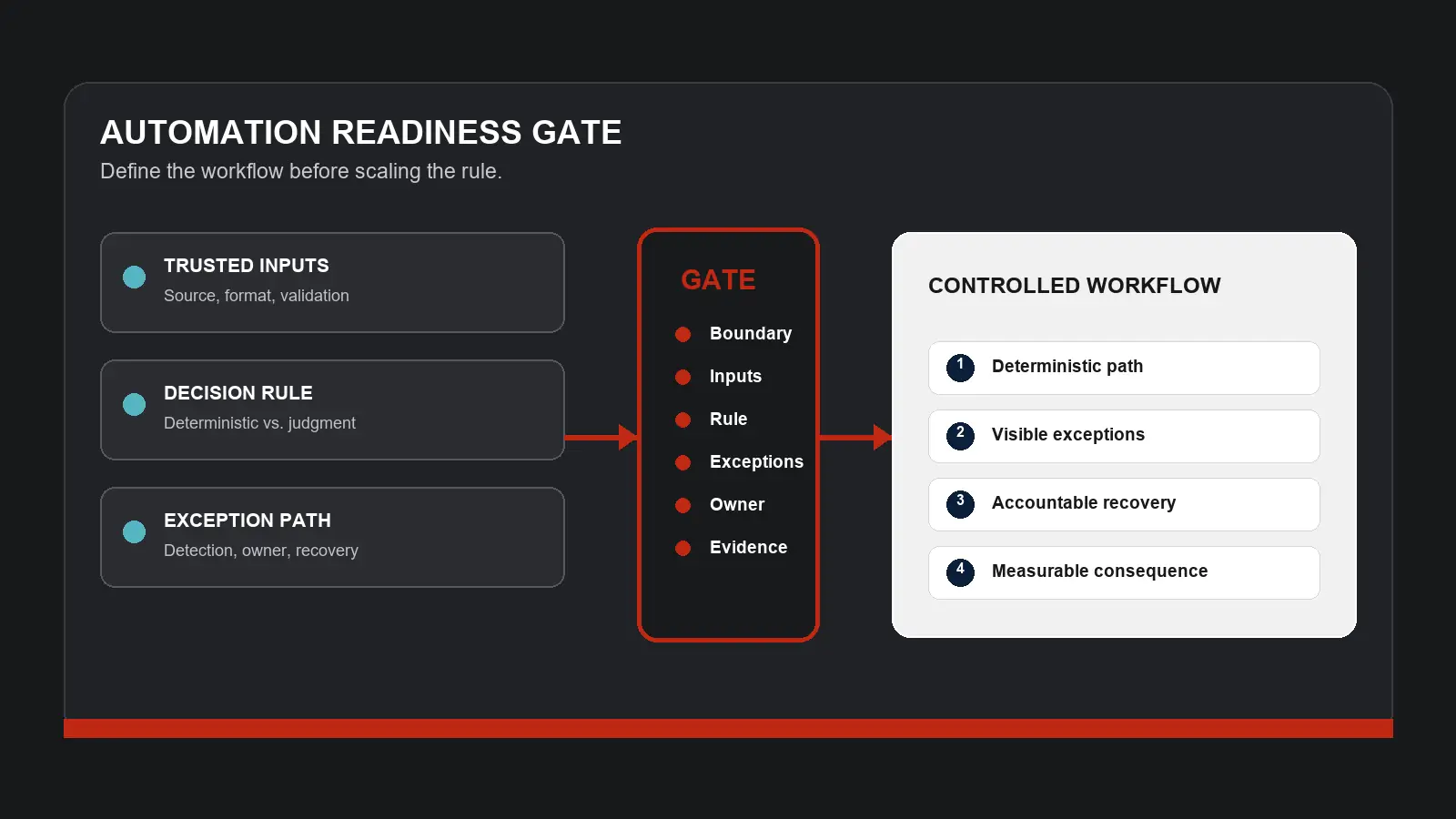
A workflow is ready for automation when the business can answer six questions with enough specificity to test the result.
1. What is the exact boundary?
Define the trigger that starts the workflow and the outcome that completes it.
“Automate order handling” is too broad. “Route paid orders with complete addresses and available inventory to the correct fulfillment queue” is testable.
Name the systems, teams, and vendors inside the boundary. If the workflow crosses WooCommerce, a payment provider, an inventory system, a warehouse, and customer support, the automation is responsible for a connected path, not one screen.
2. Which inputs can be trusted?
List every field or event used to make the decision. Name the source of truth, expected format, acceptable age, and validation rule.
Then define what happens when an input is missing, late, duplicated, or contradictory.
Automation cannot make unreliable data authoritative. It can only act on the data it receives. A controlled workflow therefore needs a clear rule for rejecting, holding, or escalating uncertain inputs.
3. What is the decision rule?
Write the rule in language a business owner can review before translating it into configuration or code.
Separate required conditions from preferences. Identify which outcomes are deterministic and which still require judgment. Record who can change the rule and how the change is approved.
If two experienced operators would reach different outcomes using the same inputs, the workflow may need policy work before automation work.
4. Where is the exception boundary?
Define the conditions the automation will not decide.
Examples may include a mismatched order total, unavailable inventory, an unsupported shipping destination, an unusual refund request, a missing customer record, or an integration response outside the expected state.
For each material exception, specify:
- how it is detected;
- where it is recorded;
- who receives it;
- what information that person needs;
- how the workflow resumes after resolution;
- what prevents the same item from being processed twice.
An exception queue without ownership is delayed manual work, not controlled automation.
5. Who owns the result and the recovery?
A developer, agency, or software vendor may implement the automation. The business still needs one accountable owner for the operating outcome.
That owner should approve the rule, define acceptance criteria, review exceptions, decide when the workflow should pause, and coordinate recovery when several systems are involved.
Technical ownership is also necessary. Name who monitors credentials, API changes, plugin updates, webhooks, scheduled actions, data mappings, and deployment changes.
When ownership is divided, write the escalation path before launch. Do not wait for the first cross-system failure to discover who is responsible.
6. What evidence will show whether it works?
Choose measures tied to the mechanism being changed.
Depending on the workflow, useful internal measures may include:
- manual touches per item;
- exception frequency by cause;
- elapsed time from trigger to completion;
- items waiting outside the standard path;
- duplicate or missed actions;
- reconciliation work;
- recovery time;
- customer contacts caused by workflow failures;
- operator time required to supervise the automation.
Record the baseline with verified internal data. Label estimates as estimates. The goal is not to prove automation is good in general. It is to determine whether this specific change reduces the constraint without creating a larger one elsewhere.
Separate deterministic work from judgment
Many workflows should not be treated as entirely manual or entirely automated.
A better design often separates three layers:
- Deterministic path. Complete, valid inputs that meet a documented rule can move automatically.
- Exception path. Known outliers are held with the evidence an operator needs to decide.
- Policy path. New or ambiguous cases are reviewed by the accountable owner and may lead to a rule change.
This structure preserves human judgment where it creates value while removing repeated execution where the decision is already known.
It also makes learning visible. If the same exception appears repeatedly, the owner can decide whether to improve the input, expand the rule, redesign the workflow, or keep the judgment manual.
Choose a controlled pilot
Do not start with the workflow that touches the most systems or carries the largest customer consequence simply because it offers the largest theoretical benefit.
Choose a bounded path with:
- a clear trigger and completion state;
- stable, accessible inputs;
- a documented decision rule;
- enough repetition to observe;
- a manageable exception boundary;
- a named business and technical owner;
- a practical manual fallback.
Examples might include validating a defined product-data update, routing a narrow order type, creating an internal exception record, or reconciling one known integration state. The right pilot depends on the brand’s verified internal workflow and risk.
The purpose is to test the operating model, not only the software.
Build the recovery path before launch
A successful test is not just a happy-path item moving from start to finish.
Test what happens when:
- an input arrives late;
- the same event arrives twice;
- a connected system is unavailable;
- credentials expire;
- a field contains an unexpected value;
- an operator changes data during processing;
- the automation completes one step and fails on the next;
- the business rule changes;
- the workflow must be paused or rolled back.
For each case, verify that the event is visible, no customer or order is left in an unknown state, and the owner can recover without reconstructing the process from memory.
Reversibility matters. Document how the automation is disabled, which queued items remain, what data has already changed, and how the manual process resumes.
Review the workflow, not just the tool
After the pilot, compare the same measures used at baseline. Review the standard path and the exceptions together.
Ask:
- Did manual work decline, or move into monitoring and reconciliation?
- Did elapsed time improve for the complete workflow?
- Which exception categories increased?
- Did another team or vendor absorb new work?
- Can the business explain every automated decision?
- Is recovery controlled?
- Does the operating benefit justify the new dependency?
The answer may be to expand the automation. It may be to narrow the rule, improve the data, redesign the process, or stop. Each is a valid operating decision when it follows evidence.
Automate the defined system
Automation should make a sound workflow easier to execute. It should not make an unclear workflow harder to inspect.
Define the boundary. Confirm the inputs. Write the decision rule. Separate exceptions from the standard path. Assign business and technical ownership. Build recovery. Measure the complete consequence.
Then choose the tool.
If manual work is growing faster than capacity, take the Growth Constraint Scorecard to identify the operating constraint before automating the next task.